Gaming Equipment 3D Icon Pack: A Practical Resource for Modern Design Workflows
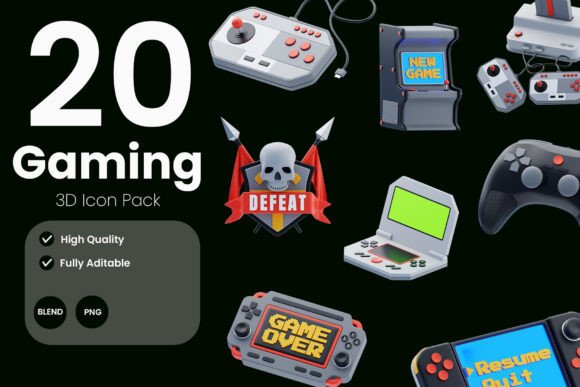
Visual assets that look polished and remain versatile are hard to find. The Gaming Equipment 3D Icon Pack tries to fill that gap for anyone working on gaming-related interfaces, thumbnails, or promotional materials. This collection delivers a set of stylized 3D icons covering common gaming gear—controllers, headsets, keyboards, mice, gaming chairs, and more. Each icon is rendered with an eye for modern aesthetics while keeping the files usable across both 2D design and 3D editing pipelines.
This review focuses on what the pack actually offers, where it excels, and who will get the most value from it. No hype, just a practical look at a tool that aims to speed up workflows and elevate visual consistency in gaming projects.
What Comes in the Pack
The icon set includes high-resolution PNG files with transparent backgrounds, which are immediately usable in most design applications. The real flexibility, however, comes from the supporting 3D formats: a full Blender source file (.blend), organized and ready for editing, plus .OBJ files for import into other 3D software. This combination means the icons are not locked into a single rendering style—you can adjust materials, lighting, or angles to match your project’s specific look.
Each icon maintains a consistent scale, perspective, and material treatment. Items like a game controller, a headset, a keyboard, a mouse, and a gaming chair share the same light setup and surface finish. This uniformity is what makes the pack useful for UI design, where mismatched icons look unprofessional even if individually well-done.
File Variety for Different Workflows
- PNG files (transparent backgrounds) – ready for web, mobile, or print layouts.
- Blender source – full control over materials, camera angle, and composition.
- OBJ format – works in Cinema 4D, Maya, 3ds Max, Unreal Engine, and many other tools.
Having both raster and 3D options means you are not forced to rebuild anything from scratch. If a client needs a slightly different color or a rotated view, you can adjust the 3D file rather than re-render or photo-manipulate the PNG.
Design Quality and Visual Consistency
The icons adopt a clean, semi-realistic 3D style. Materials are not hyper-realistic but rather stylized—think subtle reflections, smooth gradients, and rounded edges. This approach keeps the assets modern without falling into the uncanny valley of overly rendered game props. The consistent lighting direction and camera angle across all icons help them feel like part of a family rather than a random collection.
Color choices are deliberately restrained, leaning on neutral tones with small accent colors. This makes the icons adaptable to different brand palettes. If you need a more vibrant look, the Blender file lets you tweak surface colors or add emissive details. The model topology is clean enough for reasonable modification without breaking the mesh, though it is not designed for ultra-close-up hero shots—these are still icon-scale assets.
Strengths in Everyday Use
For a designer assembling a gaming app interface, the PNG files work immediately. Drop them into Figma, Sketch, or Photoshop, and they align with standard icon sizes. The transparent backgrounds mean no extra masking work. For a streamer building channel graphics, the icons can sit inside lower-thirds, overlay panels, or transition screens without looking like stock clip art. The 3D source files also allow custom framing—zoom into the D-pad of a controller for a feature highlight, or extract a keyboard’s keycaps for a unique key art piece.
Because the icons are not tied to a single rendering engine (thanks to OBJ export), they can be re-lit in real-time engines like Unity or Unreal Engine. This opens up possibilities for interactive prototypes or in-game UI elements that match the pack’s style.
Practical Value for Different Audiences
The pack is not a one-size-fits-all solution, but several specific groups will find it particularly useful.
UI/UX Designers
If you design dashboards for gaming platforms, tournament trackers, or streaming software, having a consistent set of 3D icons saves hours of asset hunting. The PNGs are the fastest path—drop them into your component library. The Blender source allows you to generate additional views (isometric, front-facing, slightly rotated) for different states or interactions.
Game Developers
Indie developers working on menus, settings screens, or inventory systems can use the icons as placeholder or final assets. The OBJ files import directly into Unity or Unreal, and with minor material adjustments, they can match a game’s lighting. For mobile game interfaces, the icon style is clean enough to avoid visual clutter at small display sizes.
Content Creators and Streamers
YouTube thumbnails, stream overlays, and social media posts often need recognizable gaming imagery. The icons’ high-resolution PNGs work well as foreground elements or background décor. Because the style is professional but not hyper-realistic, it fits both casual and competitive gaming channels. You can also animate the 3D files in Blender for motion graphics intros or scene transitions.
Marketers and Promotional Designers
Product landing pages for gaming accessories, e-sports event posters, or retail banners often feature gear icons. This pack gives you a library that looks custom-made. The consistent lighting means you can group several icons together without visual clashes. Adjusting one icon’s color in Blender to match a brand’s accent color is straightforward, and you can re-export new PNGs in minutes.
Quality, Reliability, and Customization
The Gaming Equipment 3D Icon Pack holds up under close inspection. The PNGs are well-aliased and free of visible pixelation at standard icon sizes (around 512px to 1024px). The transparent backgrounds are clean, without leftover fringe or halo artifacts—a common issue in lower-quality packs.
The Blender file is organized with named collections and materials. Layers are not messy, and modifiers (if used) are applied without breaking the editing workflow. For someone familiar with Blender’s basics, changing a material from plastic to metallic or adding a simple animation is achievable. If you are new to Blender, the file still works as a drop-in asset for renders, but custom modifications will require some learning.
The OBJ export is standard and opens correctly in tools like Cinema 4D and Maya. UVs are present, so textures or material assignments remain intact after import. No part of the pack relies on proprietary plugins or scripts—all formats are universal or widely supported.
Potential Limitations
No asset pack is perfect, and this one has a few boundaries to note. First, the number of icons is somewhat focused on core peripherals. If you need highly specialized equipment (racing wheels, flight sticks, arcade sticks, VR headsets), this pack may not cover those. The style is also specific: clean and stylized, which works for modern/minimal aesthetics but might clash with retro, cartoon, or gritty designs without heavy modification.
The PNGs, while high-resolution, are pre-rendered from one camera angle. If you need multiple perspectives, you will need to open the Blender file and render additional views yourself. The OBJ files come with no textures baked—materials are defined in the Blender file, so importing to other apps may require setting up shaders manually unless you use the provided PNGs as texture maps.
Finally, the pack is aimed at digital design, not print for very large formats. The 3D models are not built with extreme polygon counts; they work well for screen usage but may lack detail for billboard-sized close-ups.
When This Pack Shines
Use it when you need a consistent set of gaming icons fast, without reinventing the 3D modeling wheel. The pack is particularly strong for:
- Early-stage UI mockups where placeholder assets must look credible.
- Streaming overlay packages that require cohesive iconography across multiple screens.
- Indie game HUD prototypes that need 3D-style icons without requiring a dedicated 3D artist.
- Client presentations where you want to show a polished “final” look early in the design cycle.
It is less ideal for projects demanding ultra-customized or hyper-specific gear, or for those who need a massive library covering dozens of devices. In those cases, you might need to complement the pack with additional assets or custom modeling.
Final Observations and Recommendations
The Gaming Equipment 3D Icon Pack delivers what it promises: a group of well-made 3D icons that fit seamlessly into both 2D design and 3D editing environments. The inclusion of Blender source files and OBJ exports makes it more flexible than a simple PNG set, and the visual consistency across all items is above average for this price category.
If you regularly create gaming-related visuals and value time savings without sacrificing a polished appearance, this pack is a practical addition to your asset library. Start with the PNGs for rapid integration, then leverage the 3D files when clients ask for custom angles or color tweaks. It may not cover every possible gaming peripheral, but for the core set of gear—controllers, headsets, keyboards, mice, chairs—it provides a reliable and attractive solution.
Evaluate your project’s specific icon needs. If they match what is included, the pack can shorten your asset production timeline and improve visual cohesion. If your requirements extend beyond the selection, you may need to mix in other resources. Either way, the Gaming Equipment 3D Icon Pack is worth considering as a time-efficient option for designers, developers, and creators who want a clean, modern look for gaming interfaces and marketing materials.