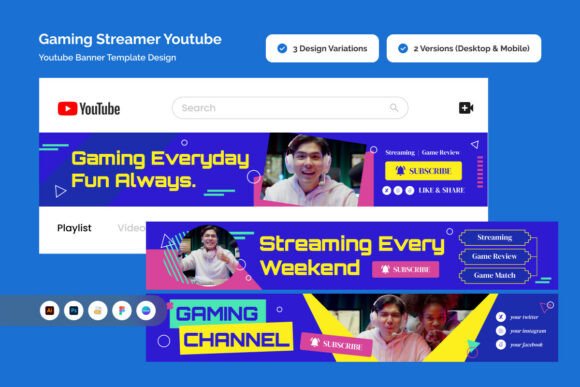
Gaming Streamer YouTube Banner: Build a Channel Presence That Actually Stops the Scroll
You have probably spent hours tweaking your stream layout, testing overlays, and picking the right emotes. But when someone lands on your YouTube channel, what do they see first? That banner at the top is not just decoration. It is the digital handshake between your content and a potential subscriber. A Gaming Streamer YouTube Banner designed with futuristic, high-energy visuals can be the difference between a quick click away and a new loyal follower.
Let's talk about what this specific banner style offers, where it fits into your workflow, and why creators at different stages of their journey are turning to neon-lit, cyberpunk-inspired designs to unify their brand.
Why the Right Banner Matters More Than You Think
Your YouTube banner is prime real estate. It appears on desktop, mobile, and TV. It is often the first branded element a viewer sees after your video thumbnail. A generic gradient or a simple text-on-background setup might feel safe, but it does not communicate energy, professionalism, or the competitive spirit that defines gaming content.
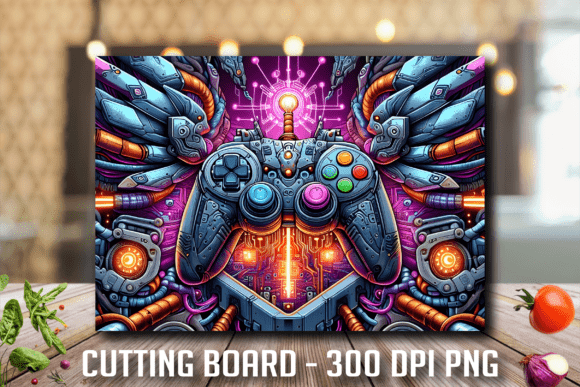
A Gaming Streamer YouTube Banner with glowing neon lines, circuit board textures, and motion blur effects does something subtler: it signals that your channel is serious, active, and part of a wider gaming culture. For a viewer browsing hundreds of similar channels, that visual cue can be the reason they pause and explore your content.
When You Are Streaming Daily and Building a Following
If you are hitting that stream button every day or several times a week, consistency matters. Your banner becomes a recognizable landmark. Regular viewers know exactly where to find you, but new visitors need a reason to stick around. A layout that includes a dedicated area for your logo, gamer tag, and social handles means your brand is clear from the moment the page loads.
Imagine someone discovers your channel after a highlight clip goes viral. They click your profile, and the first thing they see is a chaotic, low-quality banner that looks like it was thrown together in five minutes. That contrast between your exciting content and your unpolished channel page can cost you a subscriber. With a fully layered and editable design, you can drop in your existing assets and match the energy of your streams without starting from a blank canvas.
When You Are Aiming for Sponsorships or Brand Partnerships
Brands look for professionalism. A potential sponsor reviewing your channel sees your banner as part of your overall presentation. A design that borrows from eSports branding conventions—high contrast, bold typography, dynamic accents—tells a brand that you understand visual hierarchy and audience psychology. You are not just a person playing games; you are a creator running a channel like a media property.
The banner includes two size variants: a desktop version at 2560 x 423 pixels and a mobile version at 1546 x 423 pixels. For a brand manager checking your channel on a phone during a commute, that mobile-sized banner is their entire first impression. If it looks sharp and intentional, you increase your chances of being taken seriously.
Where You Can Use This Banner Beyond YouTube
While the name says YouTube, the practical applications extend further. Once you have a polished banner file, you can adapt it for other platforms. The downloadable files include Adobe Photoshop .PSD, Adobe Illustrator .AI, EPS, Figma .FIG, and a Canva link. That means you are not locked into one piece of software.
- Twitch and Kick panels: Extract elements from the banner to create cohesive panel headers for your about section.
- Discord server banner: Use the same neon and circuit board motifs to unify your community space.
- Social media headers: Resize the design for Twitter, Facebook, or LinkedIn. A unified brand across platforms makes you look established.
- Stream starting soon screens: Pull the typography and glitch patterns into your broadcast overlays for a seamless viewer experience.
For a freelancer or small business owner who also streams on the side, this efficiency matters. You do not have to reinvent your visual identity for every touchpoint. One well-structured design system saves hours of repetitive work.
For Creators Who Want a Competitive Edge Without Hiring a Designer
Not everyone has a budget for a professional graphic designer. Yet you still want your channel to look like it belongs in a competitive gaming environment. This is where the fully editable nature of the file becomes your advantage. You get the structure of a pro-level layout—neon lines, cyberpunk vibes, high-contrast zones—and you simply plug in your own text, colors, and images.
Because the files are layered, you can tweak the opacity of the glitch effects, swap out circuit board textures for something more minimal, or adjust the motion blur accents to match your personal style. If you have ever tried to create a neon glow effect from scratch in Photoshop, you know how time-consuming it can be. Starting with a file that already has those effects baked in, and then simply customizing them, puts you hours ahead.
What to Consider Before You Start Customizing
Before you dive into the .PSD or .AI file, take a moment to plan your content. A banner is only as effective as the information it communicates. Here are a few practical considerations:
- Your gamer tag and logo placement: The design includes dedicated areas for these elements. Decide which version of your logo you want to use. If you only have a text-based gamer tag, that is fine. The bold typography in the banner supports both text-only and icon-driven branding.
- Your social media handles: The layout has space for them, but choose only the platforms you actively use. Listing five handles when you only post on two makes your banner look cluttered. Pick two or three that matter most.
- Color palette: The preset cyberpunk aesthetic leans toward neon blues, purples, pinks, and high-contrast blacks. You can customize the colors, but consider whether a drastic change dilutes the futuristic energy. If your channel brand uses warm oranges or greens, test small adjustments first.
- Fonts: The bundle includes free fonts, and the documentation lists them. Stick to the provided typefaces or swap with similar free alternatives to avoid licensing headaches later.
- Preview images are not included: The download does not contain the stock images used in the preview. Have your own screenshots, gameplay stills, or avatar ready to insert into the placeholder areas.
- Lower bounce rate: A visually coherent channel page encourages visitors to browse your video library instead of clicking away immediately.
- Stronger brand recall: When someone sees your neon-styled banner on YouTube, then recognizes the same style on your Discord server or Twitter profile, that repetition builds trust.
- More professional sponsorship proposals: A channel that looks complete, with a custom banner, organized sections, and consistent branding, invites serious partnership inquiries.
How Different Users Approach This Banner
Let's consider a few realistic scenarios, because not every creator has the same goals.
The daily variety streamer who plays everything from shooters to indie puzzle games. Their banner needs to feel energetic without being tied to one specific game. The circuit board and neon lines work well here because they say "gaming" without referencing a single title. They can keep the same banner for months and it still feels current.
The competitive eSports player who focuses on one game, like Valorant or Rocket League. They benefit from the high-contrast layout and bold typography because it mirrors the intensity of competitive broadcasts. They can insert their team logo or personal emblem into the dedicated area and immediately look like part of a professional organization, even if they are currently a solo creator.
The educator or tutorial creator who makes guides for games. Their audience expects clarity and structure. The banner's clean, layered organization—with space for text and branding—communicates that same clarity. They can downplay the glitch effects if they prefer a more polished look, but the underlying layout still conveys expertise.
The small business owner or marketer who uses YouTube to promote a gaming-related product or service. They might not stream at all, but they need a channel presence that looks credible. A futuristic banner signals that they understand their audience's aesthetic. It helps bridge the gap between a commercial offering and a gaming community's expectations.
Real Outcomes From a Strong Banner Design
A banner alone will not make your channel grow. But it supports growth in specific ways:
In one practical example, a creator I know switched from a plain text banner to a cyberpunk-style layout. Their average channel session duration increased modestly over the following month. Correlation is not causation, but the change in first impressions was noticeable. Comments started mentioning the "cool banner," which is a small sign that the visual upgrade was landing with viewers.
Practical Next Steps
If you decide to use this banner, start by opening the included font documentation. Install the free fonts first to avoid missing text styles. Then open the file in your preferred software—whether that is Photoshop, Illustrator, Figma, or Canva. Replace the placeholder areas with your own assets. Export your desktop and mobile versions separately using the provided size guides.
Once uploaded to YouTube, check how it looks on both a desktop browser and the YouTube mobile app. The mobile version at 1546 x 423 pixels is especially important because a growing percentage of viewers discover channels on phones. If the text or logo gets cropped on mobile, go back and adjust your safe zones.
Remember that your banner is part of a larger system. Pair it with consistent thumbnails, a clean channel trailer, and organized playlists. The banner sets the tone, but the content keeps people there. If you treat your channel like a destination rather than a collection of uploads, the banner becomes a natural entry point.
A Gaming Streamer YouTube Banner designed with futuristic, competitive energy is not a magic solution. It is a tool. Used thoughtfully, it makes your channel feel intentional, professional, and ready for growth. Whether you are streaming daily, building a community, or positioning yourself for sponsorships, that first visual impression is worth getting right.