Raccoon Gaming Design for Sublimation: What to Know Before You Buy
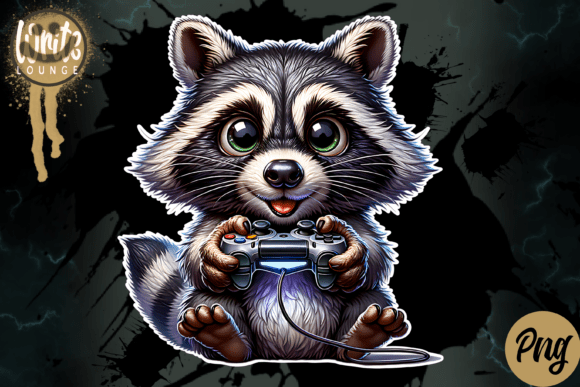
If you’ve been browsing for a unique mascot or character for your next custom product line, a Raccoon Gaming illustration might have caught your eye. With its playful, slightly mischievous appeal, a raccoon dressed for gaming fits perfectly on T-shirts, mugs, hoodies, and other sublimation projects. The design you choose can make or break your product’s success, especially when you’re investing time and materials. Before you hit download, it’s worth understanding exactly what you’re getting and how to avoid common stumbling blocks that lead to wasted prints, poor customer feedback, or unexpected costs.
What Makes a Raccoon Gaming Illustration Stand Out?
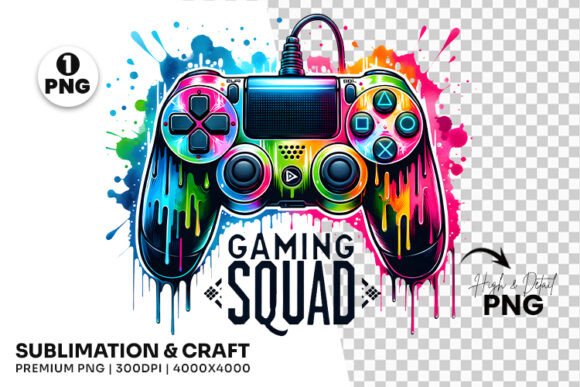
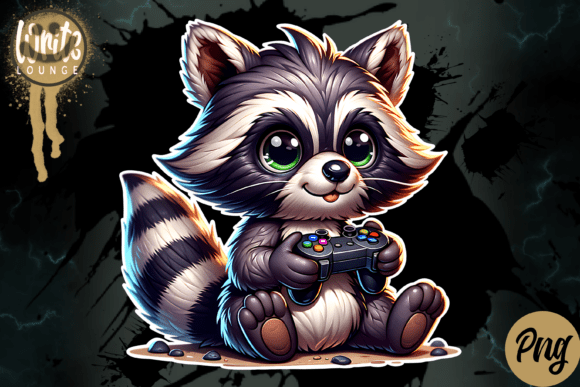
A high-quality Raccoon Gaming graphic isn’t just about a cute animal with a headset. It’s about precision, clarity, and versatility. The best files come as PNG images with transparent backgrounds, allowing you to layer them onto any colored substrate without white boxes or messy edges. A resolution of 300 dpi ensures sharp details when printed, while a pixel size over 4000 x 4000 pixels gives you the flexibility to scale the design up for a large hoodie back print or down for a small mug logo without losing quality. When you combine these specs with a well-drawn character, you get a resource that works across multiple product types and saves you time on cleanup and resizing.
Common Mistakes When Choosing or Using a Raccoon Gaming Design
Even with a great illustration, small errors in how you select or apply the file can lead to disappointing results. Here are several pitfalls that creators and small business owners frequently encounter, along with ways to avoid them.
Ignoring the True Resolution and DPI
The most frequent mistake is assuming that any image with “high resolution” in the description will print well. Many online graphics are advertised as HD but actually have a low pixel dimension or a DPI of 72—fine for screens, terrible for sublimation. When you scale such an image, you end up with pixelation, blurry lines, or a “jagged” look that feels unprofessional. For a Raccoon Gaming design meant for physical products, always confirm the file is 300 dpi and at least 4000 x 4000 pixels. This ensures your raccoon’s whiskers and controller buttons remain crisp, even on a 12‑inch wide shirt print.
Overlooking the File Format
Some sellers offer JPEG files instead of PNG. While JPEGs can be high quality, they lack a transparent background, forcing you to spend extra time removing the white area in your editing software. This extra step introduces potential edges or halos around the design, especially if you’re not experienced with layer masks. A PNG file with transparency is ideal for Raccoon Gaming graphics because it lets you place the character directly onto any garment or mug color without background cleanup. Always check the product listing to ensure you’re getting a PNG, not a flattened JPEG or a PSD that requires specific software.
Forgetting to Test on Different Substrates
Every sublimation blank behaves differently. A glossy ceramic mug and a poly‑cotton blend T-shirt will show colors and details in distinct ways. Many creators test a design only on one substrate, then assume it will look identical elsewhere. With a Raccoon Gaming graphic, the fine lines of the character’s gaming headset or the subtle shading in its fur might disappear on a dark‑colored fabric or a textured surface. Before committing to a bulk order, make a single sample print on each type of blank you plan to use. Adjust your heat press time, temperature, or pressure to match the file’s characteristics if needed.
Neglecting to Check Licensing and Commercial Use Rights
Selling products with a Raccoon Gaming design is enticing, but not all files come with commercial licenses. Some are labeled “personal use only,” meaning you cannot legally use them on items you sell. Other sellers offer extended licenses but charge extra. Failing to verify this can result in a takedown notice or a lawsuit, especially if the design becomes popular. Always read the seller’s terms before purchase. If you plan to sell T‑shirts, mugs, or other items featuring the raccoon, choose a file that explicitly grants commercial use rights, and keep a copy of the license for your records.
Using an Unoptimized Color Profile
Sublimation relies on CMYK or specific ICC profiles to ensure accurate color transfer from paper to substrate. Many Raccoon Gaming designs are created in RGB because they’re intended for digital display. Printing an RGB image directly can lead to dull, shifted, or unexpected colors—especially in the greens, blues, or purples that game‑themed graphics often use. Before sending the file to your printer, convert it to the proper color space using software like Photoshop, CorelDRAW, or Affinity Photo. Use a sublimation‑friendly ICC profile for your specific printer and ink combination to keep that raccoon’s neon controller looking vibrant.
What to Check Before Finalizing Your Raccoon Gaming Design
Taking a few minutes to verify key details can save you hours of frustration later. Here’s a practical checklist to run through:
- Pixel dimensions and DPI: Confirm the file is over 4000 px on the longest side and set to 300 dpi.
- Format: Ensure it is a PNG with transparent background (or a layered PSD/TIFF if you prefer editing).
- Color mode: Work in CMYK or an appropriate ICC profile for your sublimation equipment.
- License: Read the terms to confirm commercial use is allowed.
- Preview mockups: Look for seller‑provided renders on T‑shirts, mugs, or hoodies to judge scale and appearance.
- Customer reviews: See if other creators have successfully printed the same Raccoon Gaming graphic on real products.
Practical Advice for Getting the Best Results
Once you’ve verified the file meets your quality standards, you can optimize the way you apply it. For instance, if you’re printing on a dark‑colored T‑shirt, consider a white sublimation base layer or use a design that includes a white border or background element to maintain contrast. If you’re making mugs, test the alignment of the raccoon’s face—you don’t want its ears cut off by the mug’s rim. When heat pressing, use a protective paper sheet to prevent ink bleed, and always follow the blank manufacturer’s recommended time and temperature. Some Raccoon Gaming designs have fine text or small details (like a joystick or game console), so a slightly longer press time may help those elements transfer fully.
Realistic Example: Choosing Between Two Similar Designs
Imagine you’re comparing two Raccoon Gaming illustrations. The first costs $5, is a PNG with 300 dpi but only 2000 x 2000 pixels, and the license says “personal use only.” The second costs $12, also a PNG, 4500 x 4500 pixels at 300 dpi, and includes a commercial use license. At first glance, the cheaper option seems tempting. But when you try to scale it for a large hoodie back print, you’ll hit pixelation, and if you sell T‑shirts with it, you risk legal issues. The $12 file pays for itself after just a few sales because it works on multiple product sizes and keeps you out of trouble. That’s the kind of decision that separates a thriving side business from a frustrating hobby.
Why Quality Matters More Than You Think
Your customers—whether they’re gamers themselves or buying gifts for friends—notice details. A blurry raccoon paw or a pixelated headset can make a shirt look cheap, regardless of your printing skill. Conversely, a sharp, well‑scaled Raccoon Gaming design builds trust and repeat orders. By choosing a file with the right resolution, transparency, and licensing, you set yourself up for professional results. The extra time spent verifying specs on the front end is an investment in your brand’s reputation.
When you’re ready to pick the design for your next project, remember that a high‑quality PNG file with 300 dpi and 4000 x 4000 pixels is not a luxury—it’s a baseline. Combined with careful testing and proper usage, it will help your Raccoon Gaming illustration stand out on every T‑shirt, mug, and sublimation project you create. Avoid the common pitfalls, and you’ll be well on your way to producing products that your audience loves to wear and use.